
How Effective Project Management Ensures Successful Website Builds
Building a website for your company isn’t just about stunning visuals or clever code. It’s a complex, collaborative effort that relies on clear processes, communication, and strategic oversight to succeed. Whether you’re partnering with in-house contractors or an external agency, project management is the engine that drives the web design process—keeping timelines, budgets, and business goals aligned.
For companies aiming to launch a new site with a team of contractors, understanding how project management fits into the web design process is vital. This article will break down the key roles, phases, tools, and best practices that ensure your website project doesn’t just get done, but gets done right.
Why Project Management Is Crucial for Web Design Success
Website projects may seem straightforward on the surface, but they’re inherently multifaceted endeavors. Let’s unpack the deeper reasons why project management should never be an afterthought when building your next site.
The Web Design Process: More Than Pretty Pictures
A company website is just as much a strategic business tool as it is a digital showcase. A successful build combines:
- Strategy: Defining objectives, audience, and KPIs.
- Content: Copywriting, imagery, and brand messaging.
- Design: UI/UX development, wireframes, and visual assets.
- Development: Coding, CMS integration, and testing.
- SEO: Structure, keywords, and site optimization.
Each of these disciplines is handled by different specialists, making coordination critical.
The Role of Project Management
Project managers hold the keys to:
- Setting realistic timelines
- Mitigating risks like scope creep and blown budgets
- Facilitating clear communication between team members
- Keeping work aligned with stakeholder goals
- Reporting progress
Without this guiding force, projects quickly drift off course, resulting in frustrating bottlenecks, cost overruns, or launches that miss their mark.

Challenges Without Proper Project Management
Here’s what can go wrong when web projects are left unchecked:
- Missed Deadlines: Without a central schedule and accountability, timelines slip and launches stall.
- Scope Creep: “Just one more feature…” leads to budget strain and project bloat.
- Poor Collaboration: Designers and developers working in silos create disconnects and rework.
- Unmet Objectives: Sites launch without meeting business goals, hurting ROI.
- Incomplete Tasks: Without a complete checklist for launch, it’s easy to miss critical details or assume it’s “somebody else’s job”.
Companies looking to hire or manage contractor teams must recognize the value of strategic project management to avoid these pitfalls.
Key Roles in the Web Design Project Management Process
Central to any successful web project is a coordinated team. Each role performs unique—and interdependent—functions.
Project Manager
Think of this person as the conductor, setting the pace and keeping the entire project orchestra in sync. Responsibilities include:
- Defining project scope and deliverables
- Creating and maintaining timelines
- Coordinating communications
- Managing tasks, assignees, dependencies, and blockers
- Determining priorities and workload complexities
- Risk management and problem-solving
Web Designer
Designers transform ideas into wireframes, mockups, and final site layouts. They collaborate with:
- Copywriters (for content layout)
- Developers (for feasibility)
- SEO Experts for optimization affecting design (such as headings)
- Client for brand identity and approval
Strong communication with other team members ensures the vision aligns with technical and business needs.
Web Developer
Developers bring designs to life, handling:
- Front-end and back-end code
- Functional integrations
- Page layout & building
- Responsive design for all devices
- Troubleshooting and bug fixes
They rely on detailed design files and content, so close collaboration prevents workflow bottlenecks.
Copywriter
Responsible for:
- Crafting site messaging and brand voice
- Structuring content for both users and SEO
- Working with designers to ensure copy fits the layout
- Engaging with clients for accuracy and approval
SEO Specialist
SEO pros make sure your site is search-engine-friendly from the start, handling:
- Keyword research
- On-page optimization
- Metadata and technical structure
- Alt tags and image optimization
- Page performance & speed
- Google Tools Setup & implementation
Why Collaboration Is Critical
Every phase often overlaps. For example, if copy isn’t ready, designers can’t finalize layouts; if the design isn’t built responsively, developers face rework; if the content isn’t optimized timely, developers have to rebuild. Project managers facilitate smooth handoffs and communication so everyone knows what’s due, when, and how it connects to the next step.
The Web Design Project Lifecycle: Step-by-Step
Let’s walk through the phases of a web design project and explore how project management keeps each phase running on track:
1. Discovery & Planning
Goal: Understand the target audience, site objectives, required features, and create a project roadmap.
Key Steps:
- Stakeholder interviews
- Competitive analysis
- Defining success metrics
- Timeline and resource planning
- Assembling the project team
- Onboarding & Access
Project Management Tasks:
- Documenting everything in detailed briefs and timelines
- Assign members and due dates to keep the project moving forward
- Setting up regular check-ins and defining approval workflows
Note: For large sites, a separate Discovery period may be necessary to clearly define scope and manage expectations for both journey and budget.
2. Content Creation & Strategy
No design or development can start without content. This phase involves:
- Drafting and approving core content and messaging
- Understanding and defining the Target Audience
- Organizing info and site architecture (site map and navigation)
- Keyword research for SEO
Read our article on Content vs Design –>
3. Wireframes & Design
With strategy and content set, designers:
- Create wireframes (structural blueprints)
- Consider and design for enhanced user experience
- Develop visual mockups with provided content
- Present concepts for feedback
Centralized feedback loops (organized by the PM) ensure the team isn’t revising endlessly.
4. Development
Developers:
- Code the front end and back end
- Integrate third-parties and scoped functionality
- Layout & Build pages
- Implement interactive features
- Add WordPress Theme and Plugins
5. Testing & Quality Assurance
Once the site is built, it’s tested for:
- Bugs, broken links, and browser/device compatibility
- Accessibility (meeting ADA/web standards)
- SEO compliance
- User experience issues
- Performance & page speed
6. Launch & Post-Launch
The big day is here! The project manager coordinates:
- Final approvals
- Site migration and go-live
- Post-launch monitoring for issues
- Launch announcements
There’s also post-launch support for 30 days to fix minor bugs, feedback or content tweaks.
Communication & Collaboration: The Heart of Project Management
Effective communication is what separates streamlined launches from missed opportunities. Here’s how project management facilitates collaboration among distributed teams of contractors:
Structured Check-Ins & Status Updates
- Weekly meetings or standups keep everyone aligned
- Project dashboards summarize progress for clients and teams
Centralized Feedback
- Consolidate edits and approvals using collaborative tools, reducing back-and-forth confusion
Transparent Documentation
- Every decision, update, or approval is tracked for reference, ensuring accountability and continuous learning
This collaborative approach ensures nothing slips between the cracks—even when contractors work from different locations or time zones.
Project Management Tools for Web Design Teams
Today’s web projects demand digital solutions. Project management tools like Asana, Trello, and Jira benefit teams:
- Organize tasks and subtasks
- Set deadlines and dependencies
- Improve accountability with clear owners and assignees
- Share files and feedback
- Track progress visually with boards or timelines
- Centralize communication
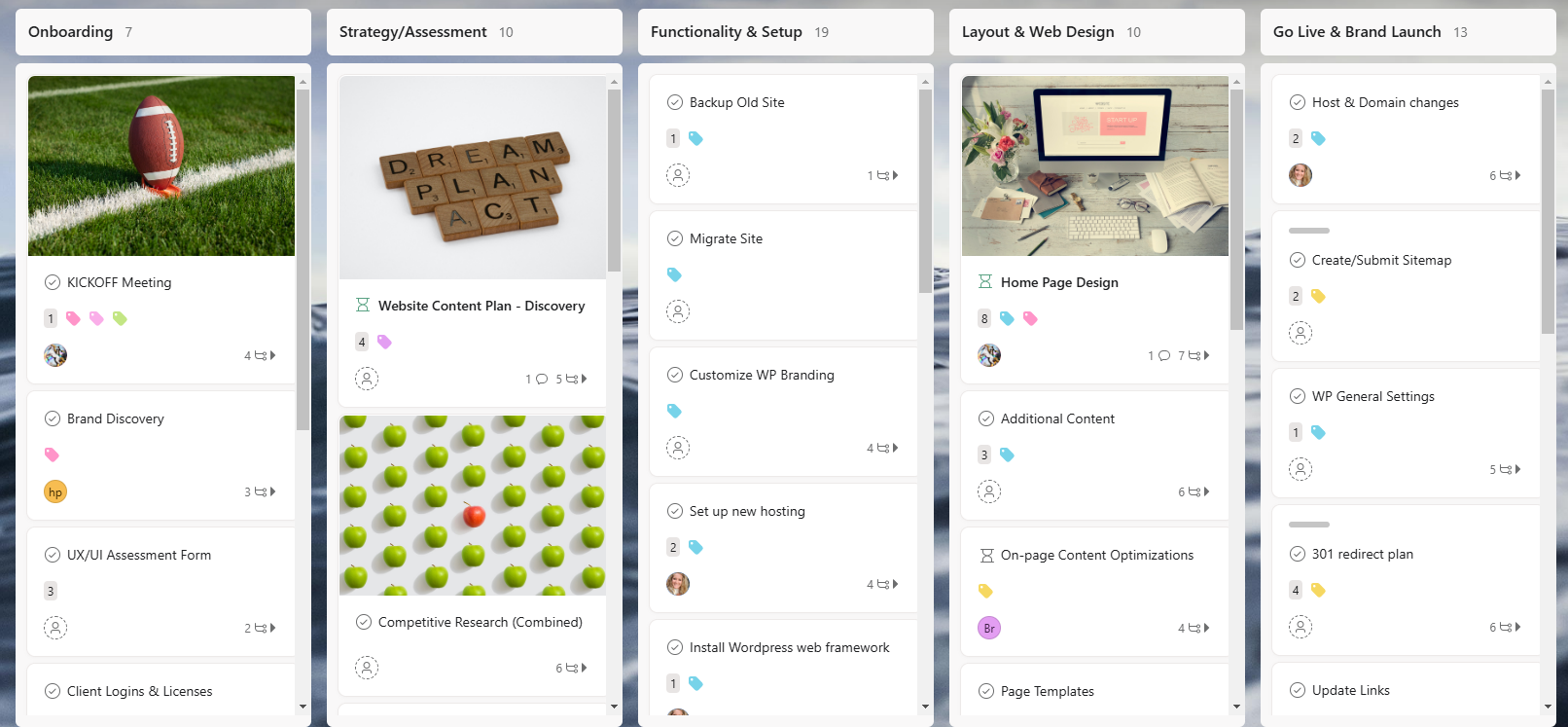
Simply Styled Sites utilizes a proprietary and fully automated project management system using asana. Learn more about asana –>
Asana’s capabilities include:
- Flexible task management and workflows
- Custom templates for website projects
- Visual timelines (Gantt charts) for managing dependencies
- Automations based on task completion
- Regular reporting and progress charts
- Internal messaging system
Preventing Scope Creep, Delays, and Other Pitfalls
Without rigorous project management, even experienced teams can fall victim to project bloat and missed deadlines. Here’s how to guard against common web design project issues:
Addressing Scope Creep
- Start with a rock-solid scope document detailing deliverables and out-of-scope items
- Use change request forms for new features or requests
Maintaining Timeline Discipline
- Break the project into phases and milestones
- Regularly update clients and teams on progress—and shifting priorities
Keeping Budgets On Track
- Plan for contingencies, such as revisions or unexpected technical challenges
- Track hours and expenses using your project management tool
Facilitating Rapid Issue Resolution
Set up a clear escalation path so that major issues get addressed quickly. Regular retrospectives after project phases help teams learn and refine for the next round.
To avoid common pitfalls and keep your projects accountable, hire us for your next website design.
Aligning Web Design Projects With Business Goals
A beautiful site is meaningless if it fails to deliver real business results. Strategic project management keeps projects tied to measurable KPIs, such as:
- Increase in lead generation or conversions
- Improved user engagement metrics
- Strong brand consistency
Tactics to Ensure Alignment:
- Align stakeholders early on project objectives
- Regularly report on progress toward KPIs, not just task completion
- Solicit end-user feedback through usability testing
For a comprehensive checklist on what every website needs, download here.
Frequently Asked Questions
What is the most important phase in managing a web design project?
All phases require attention, but the discovery and planning phase often determines scope and success. Properly understanding goals, audience, and requirements up front prevents costly mistakes in later stages.
How do companies keep a distributed team of contractors aligned?
Use robust project management tools and clear communication protocols (e.g., weekly video check-ins, documented decisions) to keep everyone on the same page, regardless of location.
How can I avoid scope creep in my web project?
Start with a detailed project scope, and ensure any changes are reviewed, documented, and approved through a formal change request process.
What should I look for in a web design project manager?
A great project manager is proactive, organized, and a strong communicator. They understand both the technical and creative sides of web projects and can bridge gaps between different specialists.
What are the best tools for managing web design projects?
Popular choices include Asana, Trello, and Jira. Each has strengths for particular workflows, so consider trialing a few to match your team’s needs.
Key Takeaways
- Project management is essential to tame the complexity of website builds.
- Each web project role—from designer to developer—must collaborate seamlessly.
- Using project management tools streamlines tasks, communication, and accountability.
- Clear planning and scope management prevent costly overruns and missed deadlines.
- Aligning web design projects with business goals ensures tangible results.
- Companies working with contractor teams need robust processes and strong communication to succeed.
Conclusion: Turn Web Chaos Into Business Results
Effectively managing the web design process is what transforms a chaotic build into a seamless, successful site launch. For companies working with distributed contractor teams, investing in project management isn’t optional—it’s mission-critical. From discovery through launch and beyond, strategic oversight ensures that your new website doesn’t just look good, it drives real business value.
If you’re ready to bring clarity and structure to your next website project, let our experts at Simply Styled Sites guide the way. Learn more about our approach or schedule a consultation. Let’s build something exceptional—together.