How Do You Define User Experience and Why Does It Matter?
Beginner UX Made Simple: What User Experience Means and Why It’s the Cornerstone of Modern Web Design
Have you ever visited a website and thought, “Wow, that was easy and even enjoyable!”? Or maybe, you’ve left a site feeling bewildered, clicking in circles, and swearing you’ll never come back? That immediate reaction is the essence of user experience, or UX.
If you’re just getting started with websites, digital products, or online marketing, you’ve likely seen the term UX pop up. But what does “user experience” really mean? And why do so many web design experts and SEO consultants insist it’s so important?
This guide from Simply Styled Sites breaks down user experience for beginners—no jargon, just helpful, real-world examples. We’ll explain why UX is the backbone of great websites, how it touches everything from design to search engine rankings, and what you need to know if you’re new to user experience.
What Is User Experience? (Beginner UX Explained)
At its heart, user experience (UX) describes how a person feels when interacting with a product, service, or website. It includes everything from the look and layout to how easily you can find information and accomplish your goals.
The Basics of UX for Absolute Beginners

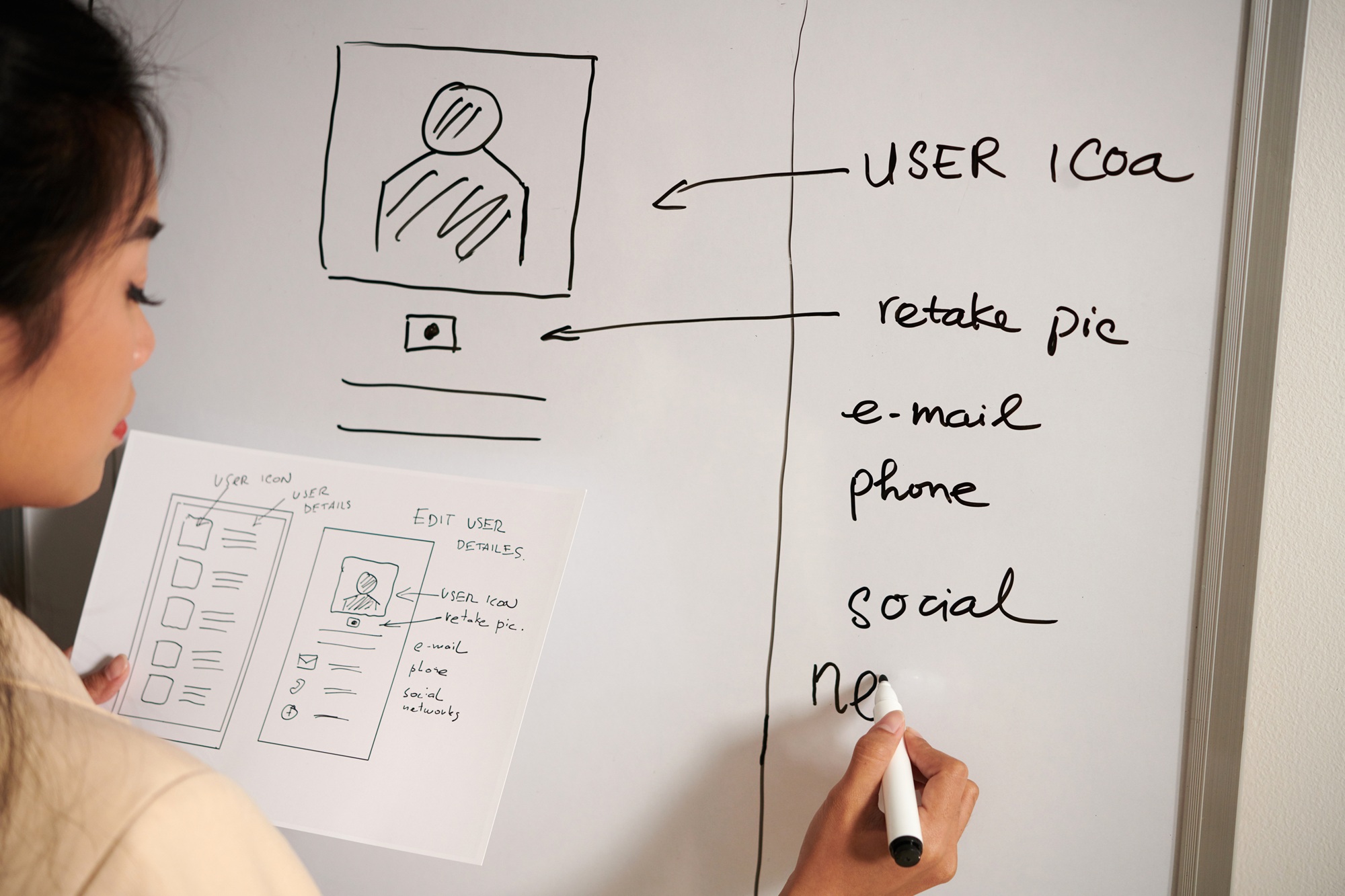
A web designer is creating wireframes for a digital product that will meet the needs of users in terms of both appearance and feel when comes to UX and UI.
- User experience isn’t just one thing. It’s a mix of many factors: how a site looks, the words it uses, how pages load, how easy it is to find your way around, and even how safe you feel.
- It starts the moment someone lands on your website and continues until they’ve left (whether they’ve bought your product, read your story, or closed your site in frustration).
- Good UX feels invisible—things just work as you expect. Bad UX stands out in all the worst ways.
Here’s an analogy: Imagine visiting two coffee shops.
In one, you’re greeted warmly, the menu is easy to read, and your coffee arrives fast and just the way you like it. In the other, the line is confusing, staff ignore you, and you can’t even find the sugar. Which one will you return to? The same principle applies to websites and apps—that’s UX in real life.
What Makes Up User Experience?
When we talk about beginner UX in web design, some essential elements come up:
- Usability: Can you do what you need to do quickly and easily?
- Accessibility: Is the website usable for people with disabilities (like screen readers or keyboard navigation)?
- Visual Design: Does it look appealing, modern, and trustworthy?
- Navigation: Is it easy to find what you’re looking for (menus, search bars, headings)?
- Content: Are the words clear, helpful, and written for real people?
- Performance: Does the site load fast, even on slow connections?
UX isn’t just about looking good—it’s about making visitors feel confident and happy.
Why User Experience Matters in Web Design
How Beginner UX Shapes Online Success
You might be wondering why people make such a fuss about UX in web design. Here’s why:
1. First Impressions Happen Fast: Studies show visitors form an opinion about your website in as little as 50 milliseconds. If your site looks messy or is hard to use, people leave—simple as that.
2. Trust and Credibility: A polished, easy-to-navigate site signals professionalism. First-time visitors need to feel that your business is reliable. Poor UX signals the opposite, and people may wonder if your site (or business) is trustworthy.
3. Reduced Frustration and Increased Engagement: If users can’t find what they need, they won’t stick around. On the other hand, good UX reduces frustration, boosts satisfaction, and makes it more likely visitors will sign up, buy something, or return later.
4. Accessibility = Inclusivity: Accessible design means everyone can use your site, including people with disabilities. That’s not just good UX – it’s the LAW in many places and the right thing to do.
5. Competitive Advantage: With millions of websites online, users have choices. Great UX can set your site apart.
See common UX mistakes by crazyegg –>
Examples: UX in Action
- Positive Example: An online clothing store with clear categories, quick filtering, honest reviews, and a fast checkout. Shopping feels easy and hassle-free.
- Negative Example: A blog with tiny text, hidden navigation, and dead links. Even if the content is good, most people will give up and look elsewhere.
How User Experience Impacts SEO
You might hear that UX and SEO go hand-in-hand. For beginners, this might sound surprising—why should search engine rankings care about how your site “feels”? But Google and other search engines now reward websites that provide a great user experience.
The UX–SEO Connection
- Search engines aim to deliver helpful, high-quality results for users’ questions. If your site is hard to use or slow to load, Google is less likely to show it high in search results.
- Key UX signals that affect SEO include:
- Page load speed (slow pages get ranked lower)
- Mobile-friendliness (is your site easy to use on a phone?)
- Bounce rate (do users quickly leave without interacting?)
- Engagement signals (how long do people stay, do they click other pages?)
- Clear structure and navigation (helps search bots and real users)
What Google Says
According to Google’s Search Central Blog, their algorithms increasingly reward websites that offer high-quality page experience. This means your UX isn’t just for people—it’s for search engines too.
What Beginner UX Looks Like in Practical Terms
So, what does all this mean if you’re new to user experience, especially in web design? Here are the practical basics:
1. Ease of Navigation
- Menus: Should be clear and easy to use. Stick to familiar labels like “Home,” “About,” “Shop,” “Contact.”
- Search: Include a search bar on bigger sites so users can quickly find what they need.
Beginner tip: Ask a friend who’s never seen your site to find specific information – record or watch them! If it takes more than a couple of clicks or they get stuck, simplify your navigation.
2. Clarity and Simplicity
- Use clear headings and plain language.
- Avoid clutter—empty space is your friend.
- Make buttons and links obvious, with descriptive text (e.g., “Get a Free Quote” instead of “Submit”).
3. Mobile Responsiveness
- More than half of all web visits happen on phones.
- A mobile-friendly site automatically adapts so users never have to pinch and zoom.
- Know what percentage of your users are on mobile from Google Analytics data.
4. Consistent Branding and Design
- Use colors, fonts, and images that reflect your brand.
- Keep layout and styles consistent across different pages so users feel confident about where they are.
5. Fast Load Times
- Large images or fancy animations can slow down your site.
- Tools like Google PageSpeed Insights can help test your website performance.
6. Accessible to Everyone
- Use Alt text on images.
- Choose readable fonts and proper color contrast.
- Allow keyboard navigation, not just mouse.
Why Every Beginner Should Care About UX
Even if you’re just starting out, focusing on user experience brings serious benefits:
- Happy users become repeat visitors (or customers!)
- Word of mouth spreads—people recommend sites they find enjoyable and helpful
- Better SEO means more potential traffic
- Less time fixing errors or fielding complaints
Remember: UX is not just for “big brands.” Every website, no matter the size, needs to care about its visitors.
Frequently Asked Questions
1. What’s the difference between UX and UI?
UX (user experience) refers to the full journey and how users feel when interacting with a website or product.
UI (user interface) focuses on how things look—the colors, buttons, fonts, and layout.
In simple terms, UI is the look, UX is the feel.
2. Do I need to hire an expert for UX, or can I handle it myself?
Many UX basics are easy to learn and apply on your own, especially with beginner-friendly guides and website builders. For complex sites or apps, consulting a UX designer can help take your site to the next level. Often times, we are too “in the weeds” of our own work and having a second or professional eyes can help.
3. How can I test my website’s user experience?
- Ask non-experts (friends, family) to complete tasks on your site and watch for where they get stuck
- Use free online tools like Google PageSpeed Insights to check performance
- Consider surveys or feedback forms for honest opinions
4. Does good UX cost more?
Not necessarily. Sometimes, removing clutter or simplifying layouts saves money and time. It’s about making smart choices, not spending more.
5. Is UX only for websites, or does it apply elsewhere?
While we often talk about websites, user experience matters everywhere—apps, online forms, even physical products like phones or cars!

Key Takeaways
- User experience (UX) = how users feel when interacting with a website
- Beginner UX in web design matters because it affects first impressions, trust, and repeat visits
- Good UX helps with SEO: Google rewards user-friendly, fast, and mobile-optimized sites
- Key elements: easy navigation, clarity, consistency, mobile friendliness, accessibility, fast load times
- Anyone can start improving UX, even without a technical background
Conclusion: Ready to Make Your Website Beginner-Friendly?
Great user experience isn’t a luxury—it’s a must-have, even for beginners. Today’s visitors expect easy navigation, speed, and clarity from every website they visit. When you invest in UX, you make life easier for your users and boost your chances of online success.
Ready to build a website that welcomes everyone? Explore our website and discover how Simply Styled Sites can help you create beginner-friendly, user-focused designs, or reach out for a free consultation.
or contact our team for personalized advice.